
You click Download on a file someone shared with you, and Google Drive shows this instead of saving it:
Too many users have viewed or downloaded this file recentlyThe good news is that it’s temporary. The fix that works most often is to make a copy of the file in your own Drive and download the copy.
In this tutorial, I’ll explain what the google drive download quota exceeded message means, how to get the file today, and what owners can change so their readers never see it.
What the download quota exceeded message means
Google’s Drive help says this message appears when a file gets a lot of views or downloads in a short period. Drive pauses downloads of that one file for a while. It isn’t a problem with your account or your computer.
You might also see the older version of the same message, which a lot of people still search for:
Download quota is exceeded for this file, so you can't access it at this timeBoth mean the same thing. Google says the restriction is temporary and typically resets within 24 hours. It doesn’t publish an exact number of downloads that triggers it.
Before you try anything, make sure this is really your error. If the message is different, my guide for when you cannot download files from Google Drive covers the other causes. Here’s a quick way to tell:
- You see the “Too many users” message: it’s the download limit. Keep reading.
- There’s no Download option at all: the owner has probably turned off downloads for viewers and commenters.
- You click Download and nothing happens: blocked cookies or a browser extension are the usual suspects.
Fix 1: Make a copy in your Drive, then download it
This is the step Google itself recommends when you have view access and need the file right away. You aren’t getting around anything. You’re saving your own copy, which you then download from your Drive.
It applies when the file shows up in your Shared with me list and the error appears on download. Here are the steps from Google’s help:
- On your computer, open Google Drive.
- Click Shared with me in the left menu and find the file.
- Right-click the file and choose Make a copy.
- Open My Drive to find the copied file.
- Right-click the new copy and choose Download.
I ran through the same Make a copy step in my demo account on November 2, 2026, using a price list PDF in my Bluebird Landscaping folder. As soon as I picked Make a copy, a small black box popped up in the bottom-left corner.
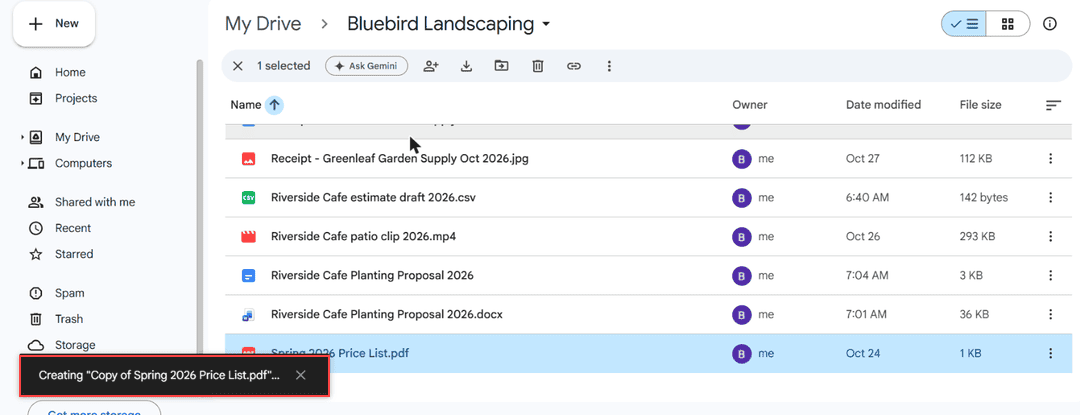
A few seconds later, the new file showed up in the list with Copy of at the start of its name. My demo file was already mine, so the copy stayed in the same folder.
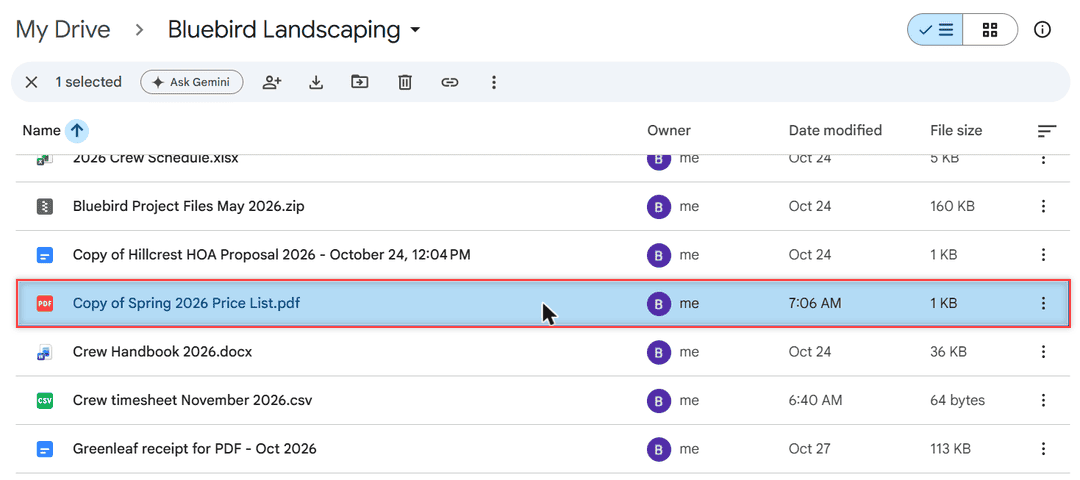
On a file someone shared with you, the copy lands in your My Drive instead, and you’re the owner of it. Right-click it there and choose Download.
One thing to keep in mind: the copy belongs to you, so it counts against your own storage. On a free account, that’s 15 GB shared with Gmail and Google Photos.
If Drive says you’re out of room, here’s what to do when Drive storage is full but shows no files.
If Make a copy fails with its own message, my guide to the error creating a copy in Google Drive walks through those causes. Once you’ve downloaded your copy, you can delete it to free the space again.
Fix 2: Wait for the limit to reset
If the copy route doesn’t work for you, or you only need the file later, waiting is the simplest fix. Google says the restriction typically resets within 24 hours.
I set a reminder for the next day and try the original download link again. There’s nothing on your side that makes the reset happen sooner, so there’s no point clicking Download over and over.
The limit is tied to that one file, not to you. Other files in the same shared folder usually download fine while you wait, so grab what you can now.
If you’re sharing a download with a group, it’s also worth telling them. Otherwise everyone keeps retrying at the same time, and the file stays busy.
Check whether the owner turned off downloads
Sometimes the real problem isn’t the limit at all. Google’s help notes that an owner can turn off printing, downloading, and copying for people who only have comment or view access.
Here’s how to tell it applies: the Download option is missing, or Make a copy is missing too. When that’s the case, the copy fix won’t help, and that’s on purpose.
The only real answer is to ask the owner. They can allow downloads for viewers or give you more access. My post on whether viewers can download Google Drive files explains what each role can do.
If you can’t open the file at all, use the button to request access in Google Drive, and the owner gets an email with your note.
Check cookies and extensions if nothing downloads at all
If every download fails, not just this one file, look at your browser. Google’s help explains that Drive uses third-party cookies to talk to its download server, so blocking them in Chrome stops Drive downloads.
To allow them for Drive only:
- Type chrome://settings/cookies in the address bar and press Enter.
- Under Sites allowed to use third-party cookies, click Add.
- Enter drive.google.com and click Add.
- Check that drive.google.com, google.com, and googleusercontent.com aren’t listed under Sites that can never use cookies.
Next, turn off all your extensions and try again. If the download works, turn them back on one at a time to find the one causing trouble.
When you’re grabbing a whole folder, a different set of hiccups can show up. My tips to download from Google Drive without zipping help there.
How to prevent it if you own the file
If people keep telling you they see this message on your file, the way you share it is the cause. Google’s own advice for owners comes down to two changes.
Share with specific people or a Google Group
Google suggests sharing access directly with specific Google Groups rather than using public links. Sharing with named email addresses works the same way. Start by switching the link to Restricted:
- Right-click the file and choose Share.
- Under General access, pick Restricted.
- Add the people or the Google Group email at the top, choose Viewer, and click Send.
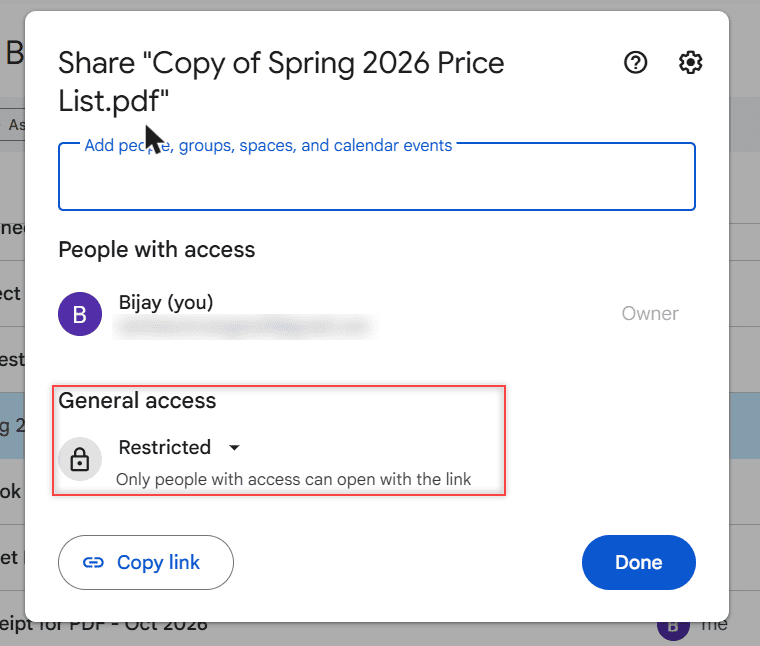
With Restricted on, only the people you add can open it. If the file used to be public, my guide to link sharing in Google Drive shows where the link setting lives.
One more detail from Google’s sharing help: if the file sits inside a shared folder, the folder’s permissions override the settings you choose for the file. So check the folder’s sharing too, not just the file’s.
Check who can download, copy, and print
Next, click the gear icon in the Share dialog to open Settings. This is where you decide whether viewers can download at all.
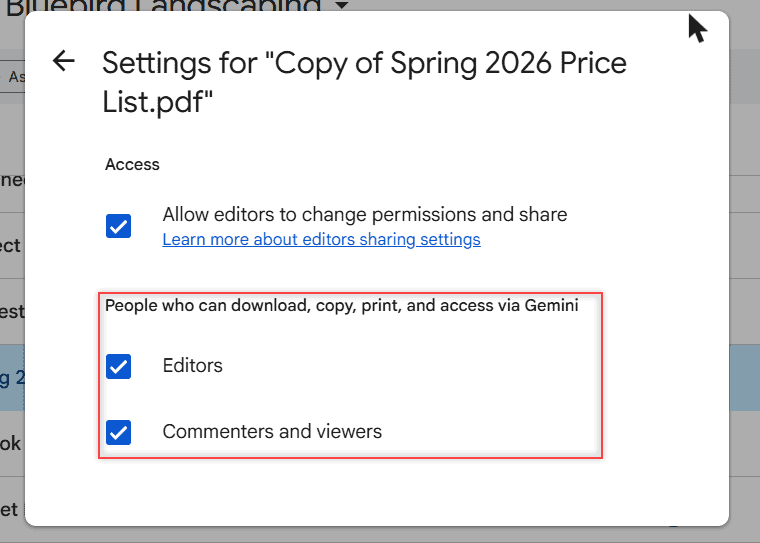
Notice that my copy got fresh default settings, with both boxes checked. A copy doesn’t keep the original’s choices, so check them again on any copy you share.
If you uncheck Commenters and viewers, they can’t download, print, or copy the file, which also means they can’t use the copy fix. Here’s how to turn off downloading for your files step by step.
Use proper hosting for big public downloads
For large files that many people download, such as ZIP archives, videos, or installers, Google recommends Google Cloud Storage or another dedicated hosting service instead of a public Drive link.
A public Drive link is fine for a handful of people. It’s the newsletter blast or the forum post with hundreds of clicks in one afternoon that pushes a file into the limit.
If you still want to keep big files in Drive for a small group, my notes on how to upload large files to Google Drive help.
Still seeing the error?
- Confirm the message says “Too many users” and not something else.
- Try the copy route from Shared with me, then download from My Drive.
- If Make a copy is missing, ask the owner. That setting is theirs to change.
- Otherwise, wait a day and try the original link again.
A few other Google Drive guides you might find handy:
- unshare a folder in Google Drive
- check who downloaded your files
- whether a Google Drive link can be dangerous
- remove shared files from Google Drive
More about this error
How long does the Google Drive download quota last?
Google says the restriction is temporary and typically resets within 24 hours. After that, the original download link should work again, as Google Drive Help on downloading files explains.
Does making a copy use my Google storage?
Yes. The copy is a file you own in My Drive, so it counts against your storage. You can delete it once you’ve downloaded it.
Why is Make a copy missing on a shared file?
The owner has probably turned off downloading, copying, and printing for viewers and commenters. Only the owner can change that, so ask them for access.
How many downloads trigger the limit?
Google doesn’t publish an exact number. Its help only says the message appears when a file gets high view or download volume over a short period.

I am Carissa Gudinoa, a technology buff, and Office online and Apple expert with over 9 years of experience. I am passionate about helping others get the most out of their Apple devices. I have written extensively about Apple products and technologies. I am committed to providing my clients with the best possible service and am always up-to-date on the latest Apple products and features. I also write extensively on other software available for use at minimal cost or free. This includes Word Online, Outlook Online, Excel Online, and other Office online programs… Check out more.