
Dana runs the office at Bluebird Landscaping, and every new client file should land in one place. Sending her files one at a time got old fast, so I shared the whole “Clients 2026” folder with her instead.
In this tutorial, I’ll show you how to share a Google Drive folder by email or with a link, what people can do inside it with each role, how sharing flows down to the files, and how to pull access back later.
What each role can do inside a shared folder
A folder works a little differently from a single file, which I covered in my guide on how to share one file on Google Drive. Whatever role you pick applies to everything in the folder:
| Role | What they can do in the folder |
|---|---|
| Viewer | Open every file in it, but not edit, comment on or share anything |
| Commenter | Comment on individual files, but not change the folder structure or share it |
| Editor | Open, edit, delete, move and add files, and by default change permissions and share |
Dana needs to add files, so she gets Editor. For a client who should only look, Viewer is the safer pick.
Method 1: Invite people by email with a role
Open Share on the folder
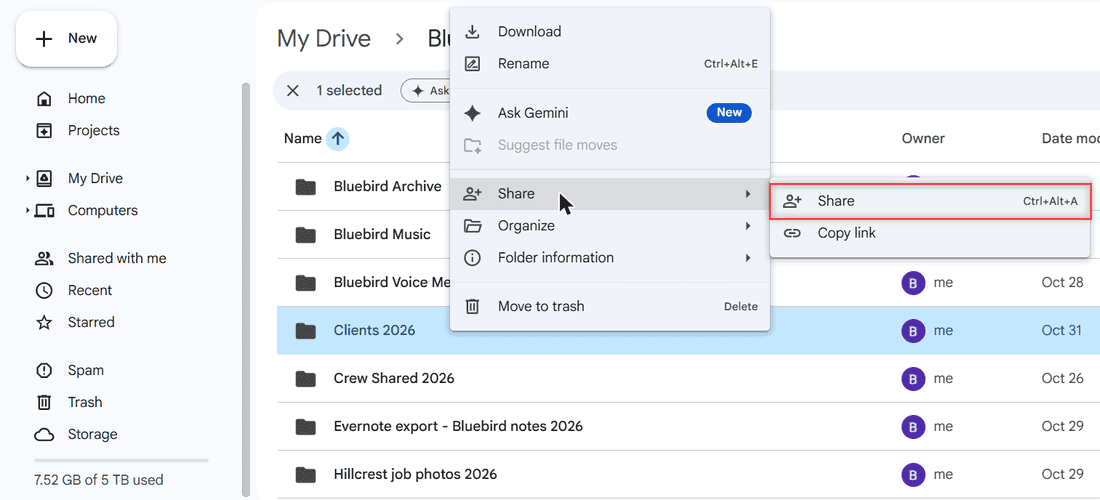
In My Drive, I opened Bluebird Landscaping and right-clicked the Clients 2026 folder. Then I pointed to Share and clicked Share in the submenu. Ctrl+Alt+A does the same thing once the folder is selected.
Add the person
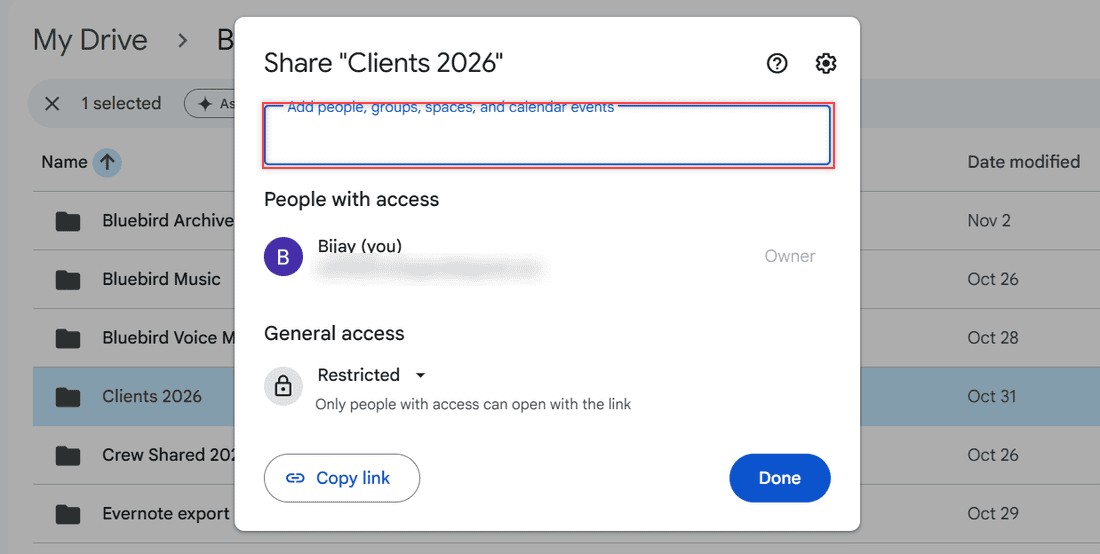
The dialog reads Share “Clients 2026”. Click the box that says Add people, groups, spaces, and calendar events and type an email address. Under General access, mine showed Restricted, so only people I add can get in.
Choose the role
When I typed dana.brooks@example.com, a role menu showed up with Editor already checked. For a folder, Editor carries the note “Organize, add, and edit files,” which is exactly what Dana needs.
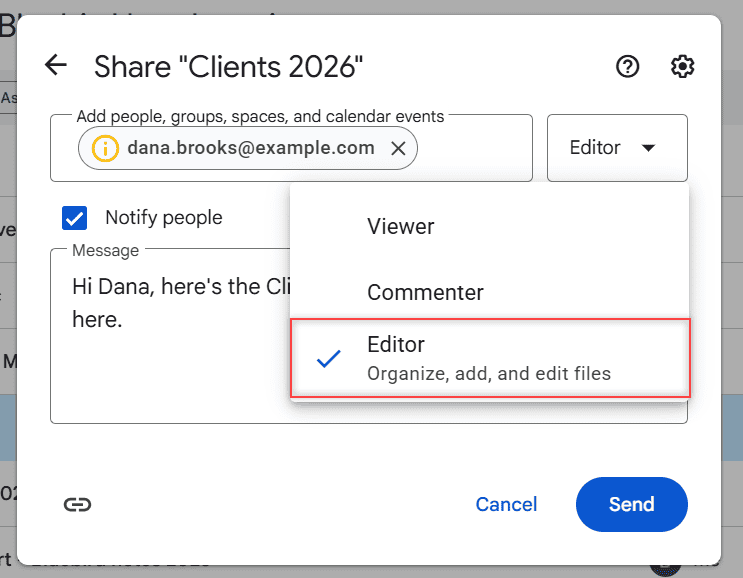
Pro tip: Editor is the default, so open this menu every time. If the person should only read, switch to Viewer before you send.
Add a note and send
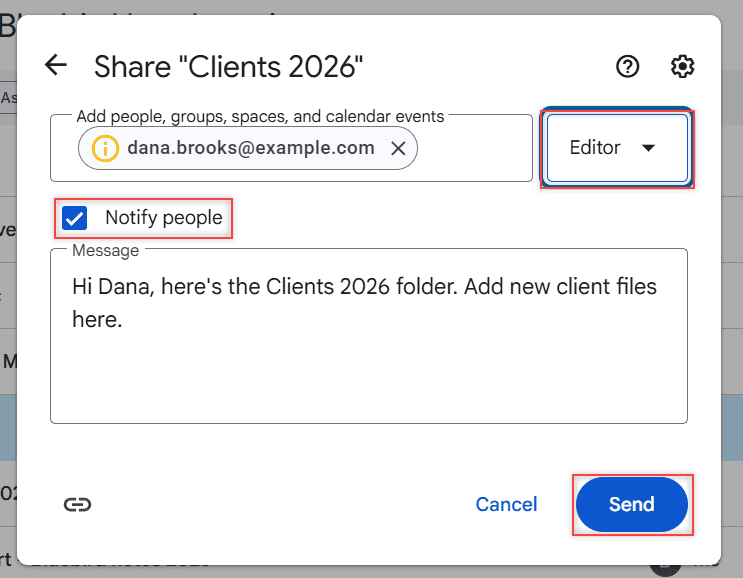
Keep Notify people checked so Google emails them a link. I wrote, “Hi Dana, here’s the Clients 2026 folder. Add new client files here.” Then you’d click Send. My address was made up, so I clicked Cancel and nothing went out.
How does this work?
Sharing a folder shares everything in it, including files you add later and anything in its subfolders inside Google Drive. You don’t have to share each file again.
Method 2: Share the folder with a link
If the person doesn’t use a Google account, a link is easier. In the Share dialog, open the General access menu, switch Restricted to Anyone with the link, choose the role and click Copy link.
The steps match what I showed for files when I turned on link sharing in Google Drive. Paste the link in an email, a text, or a WhatsApp chat.
How does this work?
Anyone holding the link can open the folder without signing in, and they show up as anonymous animals. Work and school accounts also get an option that limits the link to your organization. My personal account didn’t have it.
Method 3: Share a folder from your phone
In the Google Drive app, tap the three dots next to the folder and tap Share. Add the email address, pick a role and send. The link option is in the same place.
Keep one file private inside a shared folder
Here’s the catch with folders: you can’t give someone less access to a file than they have to its parent folder. If Dana is an Editor on Clients 2026, she’s an Editor on every file in it.
To keep one file away from her, move it to a different folder. Or limit a folder: open Share, click the gear, turn on Limit access, then click Back and add only the people who should see it.
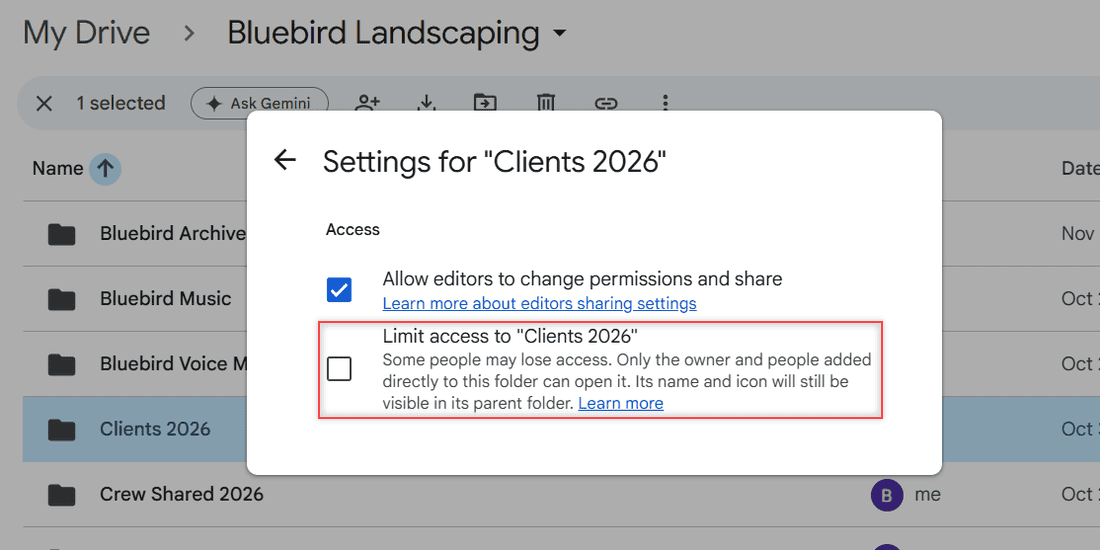
I left both boxes alone in my test. Unchecking Allow editors to change permissions and share stops editors from inviting others. If someone you didn’t add asks to get in, my notes on Google Drive access requests explain what to do.
Stop sharing the folder
Open Share on the folder, click the down arrow next to the person’s name, pick Remove access and click Save. If you used a link, set General access back to Restricted. My full steps to unshare a folder in Google Drive cover the rest.
On the receiving side, people can remove shared files from their Drive if they don’t want a folder anymore.
Things to keep in mind
- You can add up to 600 individual email addresses. For bigger teams, share with a Google Group.
- Files someone uploads to your folder use their storage, not yours. More on that in how shared folders use storage.
- Access expiration dates only exist on work and school accounts, and on folders they work only for the Viewer role.
- The folder settings have no download, print or copy checkboxes. Those only appear when you share a single file.
Planning to share more than one folder this week? These will help:
- get notified when files land in a folder
- whether a Drive link can be dangerous
- every Google Drive tutorial I wrote
Frequently Asked Questions

I am Carissa Gudinoa, a technology buff, and Office online and Apple expert with over 9 years of experience. I am passionate about helping others get the most out of their Apple devices. I have written extensively about Apple products and technologies. I am committed to providing my clients with the best possible service and am always up-to-date on the latest Apple products and features. I also write extensively on other software available for use at minimal cost or free. This includes Word Online, Outlook Online, Excel Online, and other Office online programs… Check out more.