
Built-in expiration dates in Google Drive are for work and school accounts only. On one of those, open Share, click the down arrow next to the person, click Add expiration, pick a date, then click Save.
A personal Gmail account doesn’t have that option.
In this tutorial, I’ll show you how to set an expiration date on google drive sharing on a work or school account, what the personal account menu really offers, and the simple manual routine I use instead.
My sample file is 2026 Crew Schedule.xlsx from my demo business, Bluebird Landscaping Co., in Austin. I want a seasonal crew lead to have it until the end of the fall season.
Add an expiration date on a work or school account
I’ll be straight with you: I don’t have a Workspace account to test on. These steps come from Google’s help page, so I won’t guess at what the screen looks like.
- Open the file in Google Drive and open Share.
- Next to the person’s name, click the down arrow.
- Choose Add expiration.
- Select a date within one year.
- Click Save.
So my crew lead could get access through November 30, 2026, as long as that date falls within the one-year window.
The person has to be on the file first. Here’s my Share dialog with only me listed, and there’s nobody to put a date on yet.
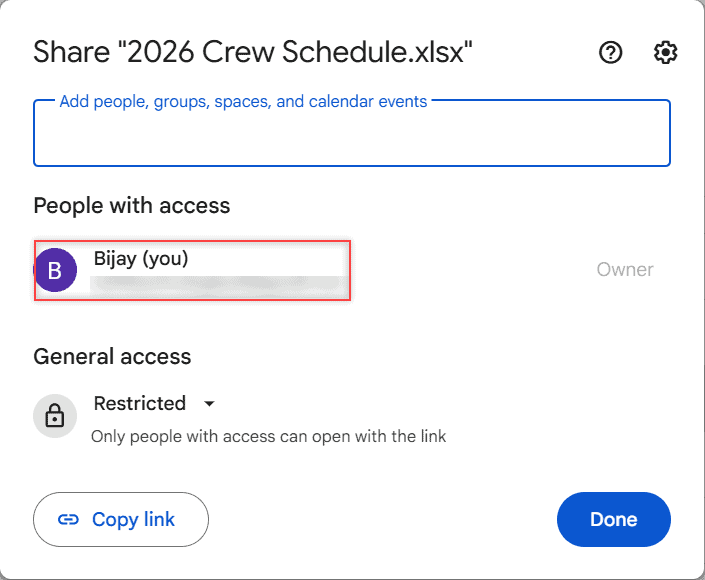
If you haven’t added anyone, start with sharing a file on Google Drive and come back to set the date.
The limit for shared folders
Folders have one extra rule. Google says that for folders, expiration is only available for Viewer roles.
So a person with Editor access to a folder can’t get a date unless you change them to Viewer. Viewer isn’t always locked down, either, so check whether viewers can download your files before you rely on it.
For the wider setup, here’s how sharing a whole Drive folder works.
What a personal Google account shows instead
I tested this on my demo personal account. I added a person, then opened the role menu next to their name.
The menu lists Viewer, Commenter, Editor, Transfer ownership and Remove access. There’s no Add expiration.
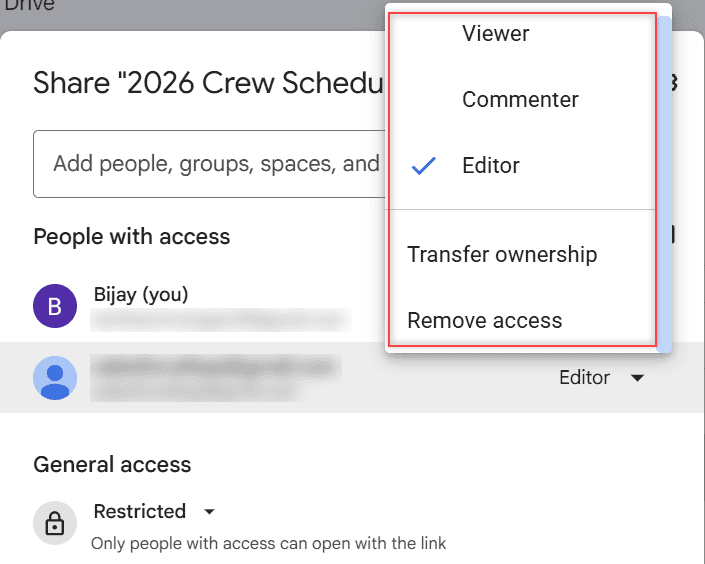
If an older guide sent you looking for this on a free account, don’t spend time hunting. It simply wasn’t in that menu when I checked.
Remove access by hand on a personal account
Here’s what I do instead. It takes two minutes, and it only depends on you remembering, which is what the reminder is for.
- Add a calendar reminder for the day access should end, like November 30, 2026. Put the file name in the title.
- When it fires, open the file in Drive and open Share.
- Click the role menu next to the person’s name.
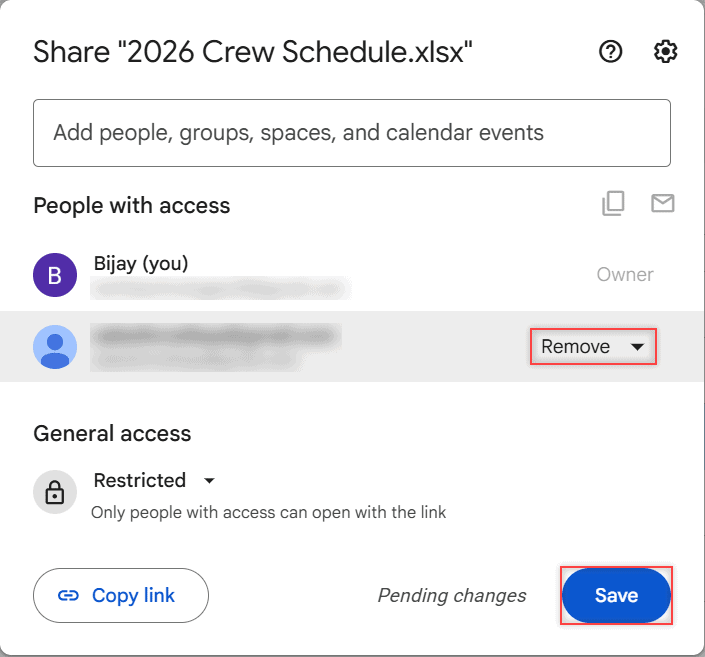
- Choose Remove access.
- Click Save.
Don’t skip that last step. After I chose Remove access, the name was struck through and the dialog said Pending changes. Nothing is final until you save.
Pro tip: Add the person’s name to the reminder too. If you’ve shared the file with several people, you’ll know exactly who should come off the list.
Sharing a whole folder instead? Here’s how to unshare a folder in Google Drive.
When the option does not appear
- You’re on a personal account: the option isn’t offered, so use the reminder routine above.
- The person isn’t added yet: add them first, since the arrow sits next to their name.
- It’s a folder and they aren’t a Viewer: Google limits folder expiration to Viewer roles.
- You’re signed in to the wrong account: check which Google account is active.
I also leave third-party scripts and add-ons out of this. They’d need access to your Drive, and a calendar reminder does the job. If a link is the problem, check your link sharing settings.
These Drive guides pair well with this one:
- removing shared files from Drive
- handling Google Drive access requests
- all my Google Drive tutorials
Quick answers
Can a free Gmail account set an expiration date in Google Drive?
No. Google’s Drive help says the feature is available for work and school accounts, and my personal account’s menu had no Add expiration.
How far ahead can I set the expiration date?
Google says to pick a date within one year.
Does Google tell the person when access expires?
Google’s help page doesn’t say, so I can’t promise either way. If it matters, tell them yourself ahead of time.
Can I give a folder editor an expiration date?
No. Google limits folder expiration to Viewer roles, so you’d have to change them to Viewer first.

I am Carissa Gudinoa, a technology buff, and Office online and Apple expert with over 9 years of experience. I am passionate about helping others get the most out of their Apple devices. I have written extensively about Apple products and technologies. I am committed to providing my clients with the best possible service and am always up-to-date on the latest Apple products and features. I also write extensively on other software available for use at minimal cost or free. This includes Word Online, Outlook Online, Excel Online, and other Office online programs… Check out more.