
Why does Google Drive hand you a ZIP file when all you wanted was three normal files? It does that every time you download more than one file, and every time you download a folder, even a folder with a single photo in it.
In this tutorial, I’ll show you four ways to get a Google Drive download without zipping: downloading files one at a time, picking a format for Google Docs, using Google Drive for desktop and saving files from your phone. I tested each one in my demo account.
Why Google Drive zips your downloads
On a computer, you can click a file and then Ctrl-click (Command-click on a Mac) to select multiple files in Google Drive. I picked three files in my Bluebird Landscaping folder: a Word file, a CSV timesheet and a Google Doc. Then I right-clicked and chose Download.
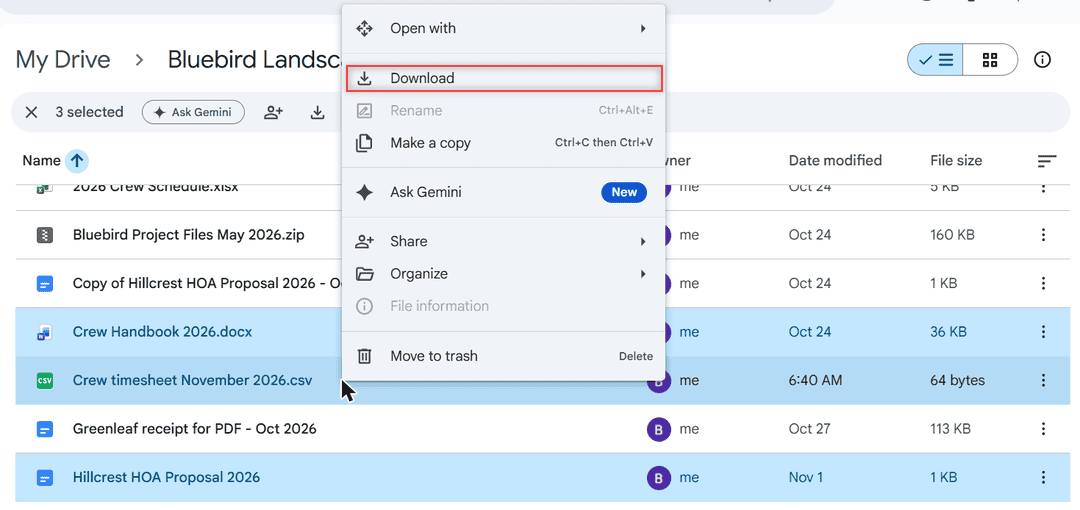
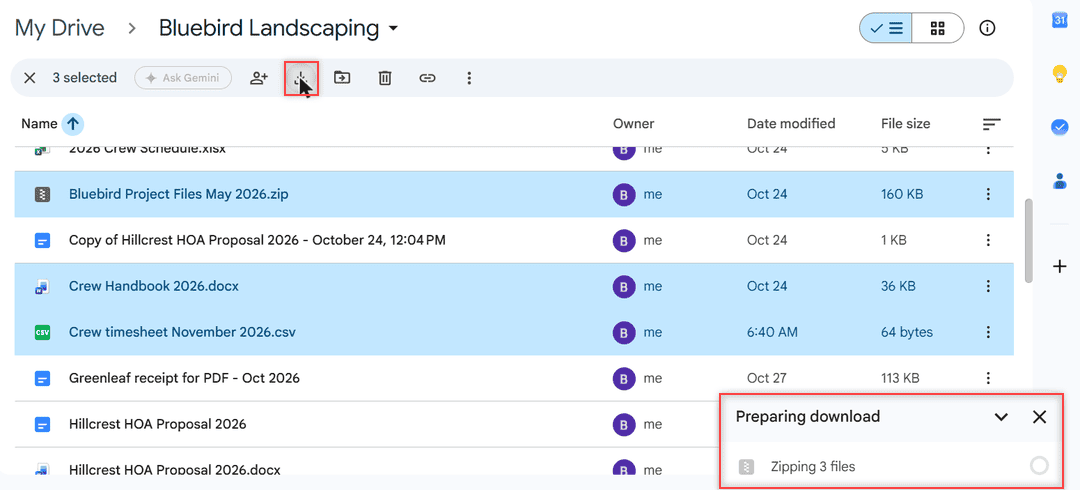
The toolbar Download icon does the same thing. Drive shows a Preparing download panel in the bottom-right corner that says Zipping 3 files. A moment later it changed to Download ready, 3 files zipped, and the browser saved one ZIP file.
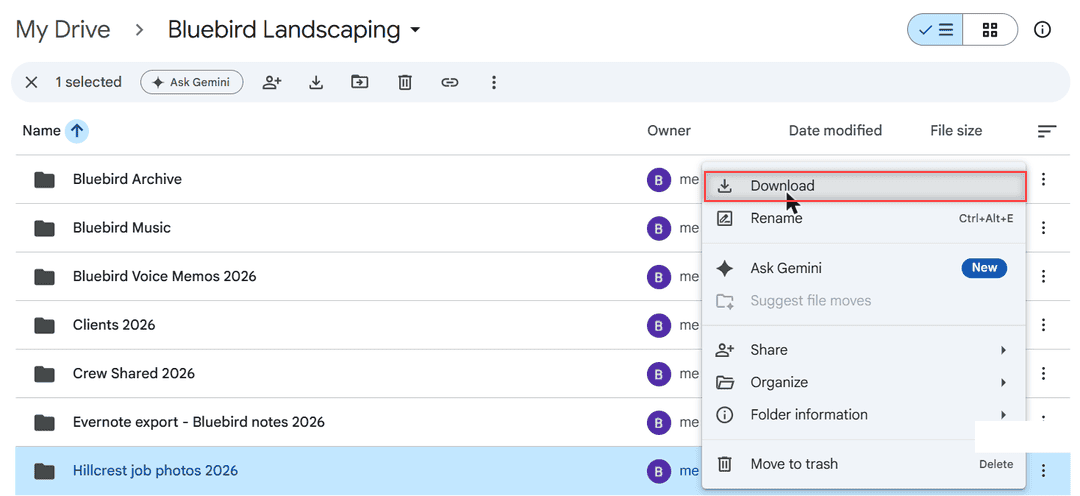
Folders work the same way. I opened the three-dot More actions menu on my folder Hillcrest job photos 2026 and chose Download.
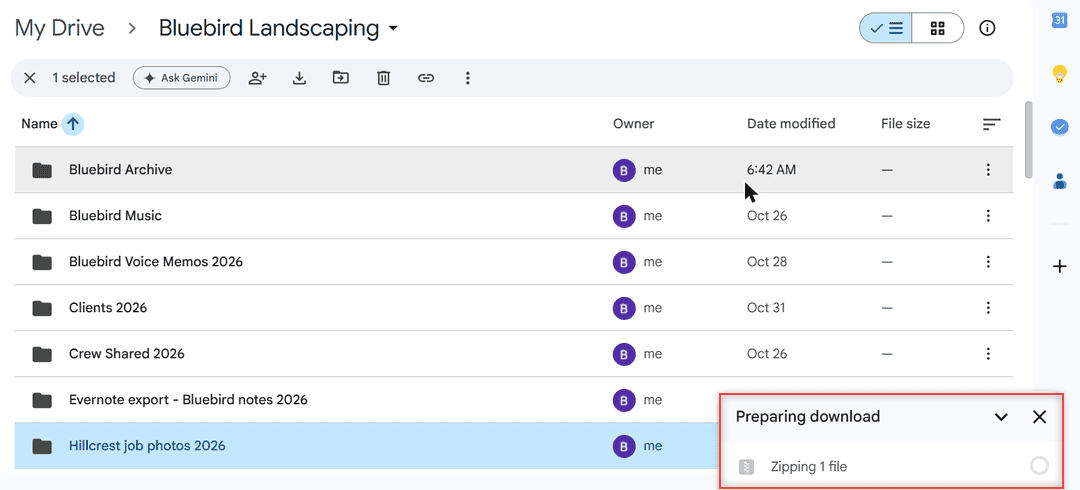
That folder holds just one file, and Drive still zipped it. So there’s no setting to switch off here: more than one file, or any folder, means a ZIP.
Method 1: Download files one at a time
The simplest fix is to download each file on its own. A single file comes down as the file itself, with no ZIP around it.
- Go to drive.google.com on your computer.
- Right-click one file and choose Download.
- Repeat for the next file.
How does this work?
Drive only builds a ZIP when it has to bundle several items into one download. One file needs no bundle. It’s slow for 40 files, but perfect for three or four. If a single file won’t download at all, my guide on why you cannot download files from Google Drive covers the usual causes.
Pro tip: Google says you can’t drag a file or folder from Drive straight to your desktop, so don’t waste time trying. Use Download, or Method 3 below.
Method 2: Choose a format for Google Docs, Sheets and Slides
Google Docs, Sheets and Slides files aren’t regular files until you download them, so pick the format yourself. In my Google Doc Hillcrest HOA Proposal 2026, I opened File > Download.
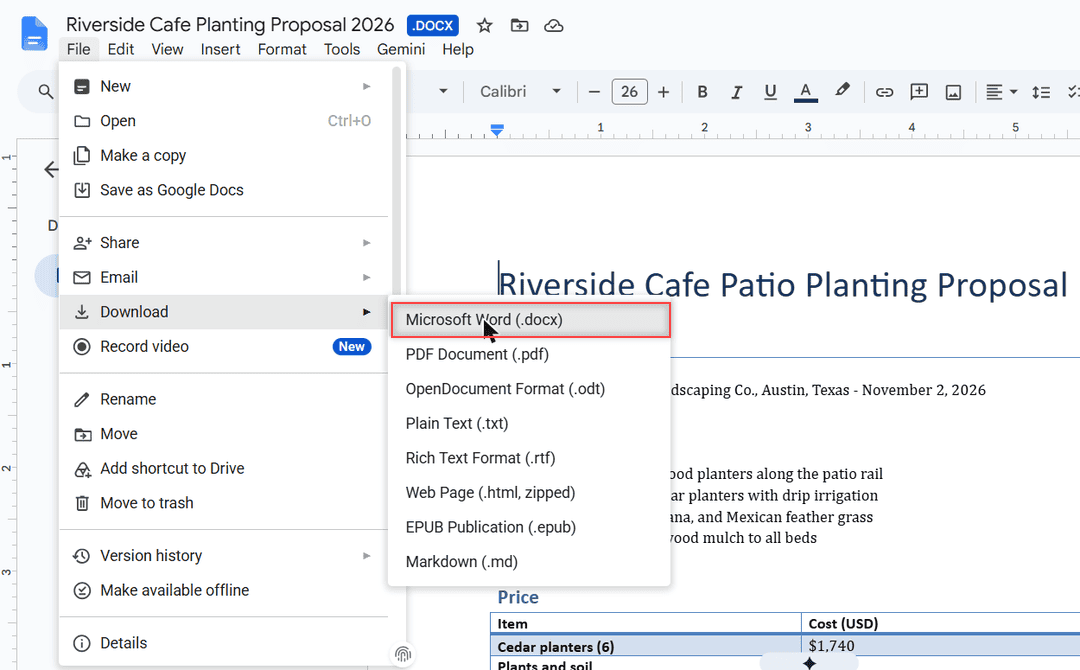
The list offers Microsoft Word (.docx), PDF, ODT, Plain Text, RTF, Web Page, EPUB and Markdown. I chose Word, and the browser saved a plain .docx file.
How does this work?
You get one file in the format you picked. Avoid Web Page (.html, zipped), though. As the name says, that one comes down as a ZIP because it packs the page and its images together.
Sheets and Slides have the same File > Download menu with their own formats, like Excel or PowerPoint. Do this once per file and you end up with normal files you can open in any app.
Method 3: Use Google Drive for desktop
If you download lots of files, this is the method I’d use. Google Drive for desktop replaced the old Backup and Sync and Drive File Stream apps, and it puts your Drive in File Explorer on Windows or Finder on a Mac. Here’s how to install Google Drive on your computer.
- Download and run GoogleDriveSetup.exe (Windows) or open GoogleDrive.dmg (Mac), then sign in.
- Open File Explorer or Finder and go to the Google Drive folder, then My Drive.
- Select the files or folder you want and copy them to a folder on your computer, like Documents.
How does this work?
Drive for desktop shows your files like any other drive, so copying them out is a normal copy, with no ZIP involved. The same folder also shows Shared drives if you have any, so team files copy out the same way.
Streaming uses almost no disk space, while mirroring keeps a full copy on your computer. If the app won’t open, see what to do when you cannot launch Drive for desktop.
Method 4: Save files from the Drive app on your phone
The Google Drive app downloads files one by one, so you never get a ZIP there either. On Android, tap More (three dots) next to the file name and choose Download. Here’s more on how to save files to your phone from Google Drive.
On an iPhone or iPad, tap More next to the file and choose Download, or Open in > Save to Files. For pictures, I wrote a separate guide to save multiple photos to your iPhone.
Things to keep in mind
- On Android, the Download option disappears when Data Saver is on in your network settings. Turn it off first.
- If you block third-party cookies in Chrome, Drive downloads can stop working. Allow cookies for Drive if nothing happens when you click Download.
- A ZIP isn’t a dead end. Your computer can extract it with a double-click, and you can also view ZIP files in Google Drive without downloading them.
- I tested this in a personal Gmail account. In a work or school account, your organization may need to install Drive for desktop for you. My page on Google Drive personal vs business covers other differences.
Moving lots of files around? These might help
- upload large files to Google Drive
- see folder size in Google Drive
- fix the download quota exceeded error
- move files from Google Drive to iCloud
Frequently Asked Questions
Can I stop Google Drive from zipping files?
There’s no setting for it. Drive zips any download with more than one file and every folder, so download files one at a time or copy them out with Google Drive for desktop.
Why does Google Drive zip a folder with only one file in it?
Drive always packs folders into a ZIP, no matter how many files are inside. Open the folder and download the file itself instead.
How do I download a folder from Google Drive without zipping it?
Install Google Drive for desktop, open the Google Drive folder in File Explorer or Finder, and copy the folder to your computer. It arrives as a normal folder.
Why is the Download option missing in the Google Drive app?
On Android, Download isn’t available when Data Saver is on in your network settings. Google Drive Help: download a file.

I am Carissa Gudinoa, a technology buff, and Office online and Apple expert with over 9 years of experience. I am passionate about helping others get the most out of their Apple devices. I have written extensively about Apple products and technologies. I am committed to providing my clients with the best possible service and am always up-to-date on the latest Apple products and features. I also write extensively on other software available for use at minimal cost or free. This includes Word Online, Outlook Online, Excel Online, and other Office online programs… Check out more.