
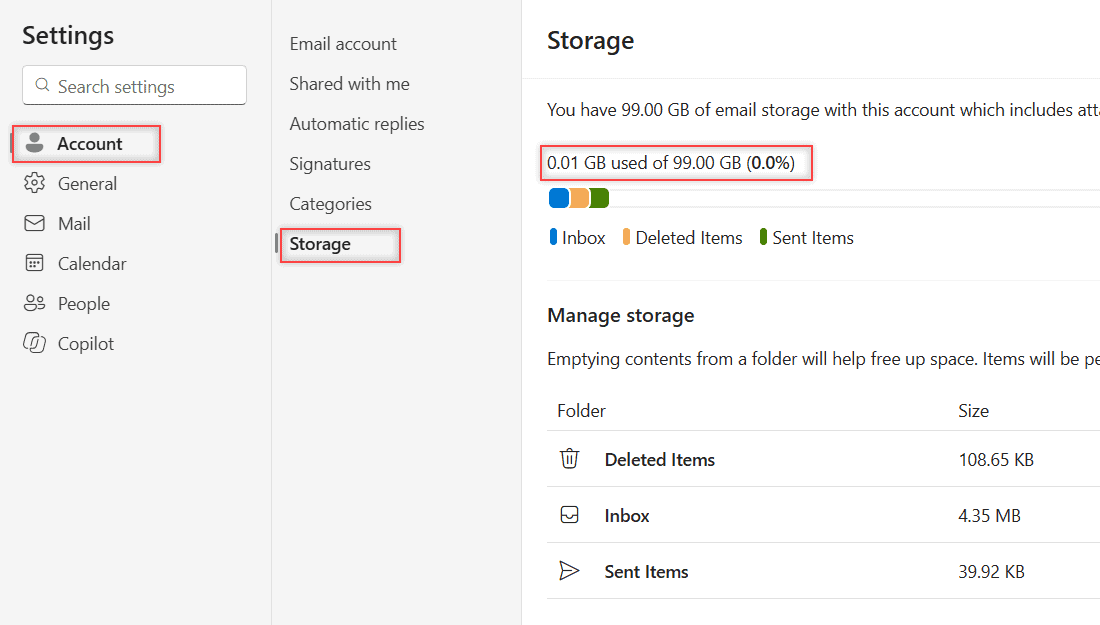
You can check it in Settings > Account > Storage, and in my Microsoft 365 work mailbox it says 0.01 GB used of 99.00 GB. That one page also shows which folders take up the space.
In this tutorial, I’ll show you how to check Outlook storage on the web, what the numbers mean for work and personal accounts, and what you can safely clear when the mailbox gets full.
Where Outlook on the web shows your storage
I tested this in a work mailbox for my made-up business, Bluebird Landscaping Co. Here’s the path:
- Click the Settings gear at the top right.
- Choose Account. Its list shows Email account, Shared with me, Automatic replies, Signatures, Categories, and Storage.
- Click Storage.
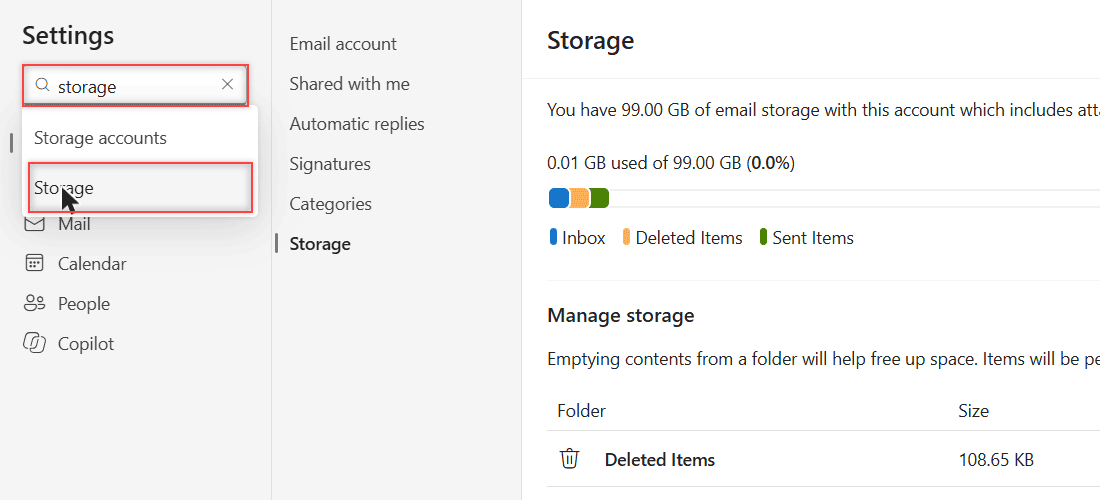
Can’t find it? Type storage in the Search settings box. Outlook suggested Storage accounts and Storage, and the second one opens the same page.
While you’re in Settings, the recent search history in Outlook is another thing you can tidy up.
What the Storage page tells you
The top line said, “You have 99.00 GB of email storage with this account which includes attachments and messages across all folders.” Below it was “0.01 GB used of 99.00 GB (0.0%)” and a colored bar.
The bar’s legend split my usage into Inbox, Deleted Items, and Sent Items. Under it, a Manage storage table lists each folder with its Size and Message Count.
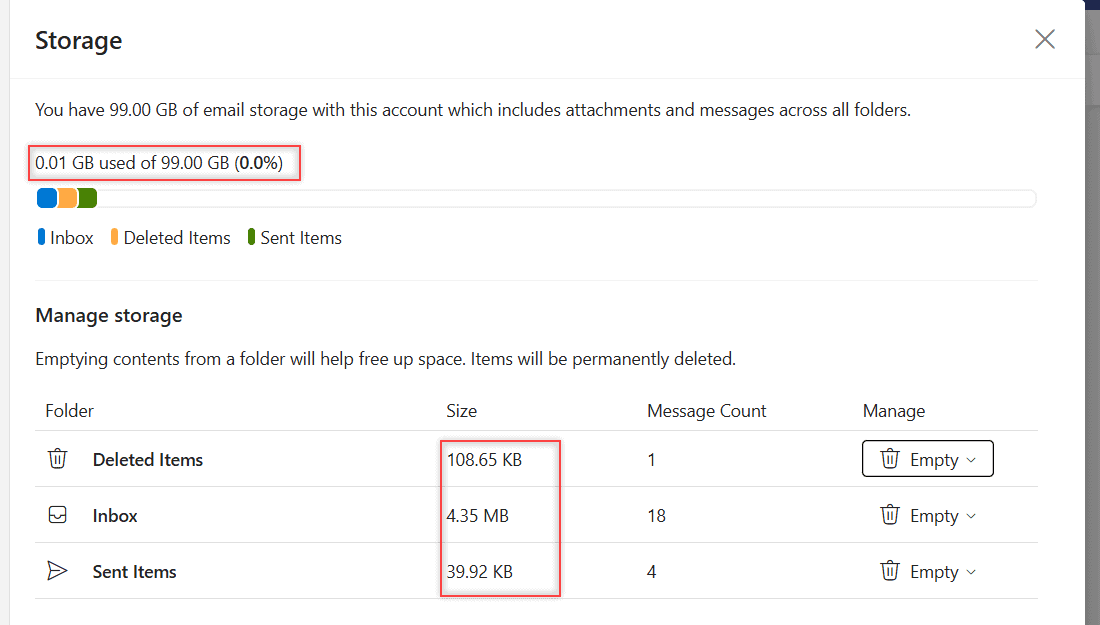
My Inbox had 18 messages at 4.35 MB. Deleted Items held 1 message at 108.65 KB, and Sent Items had 4 at 39.92 KB. The biggest folder is usually where you start cleaning.
To find the heavy emails inside a folder, you can sort your Outlook emails by size and look at the top of the list.
How much storage each account type gets
The number on your page depends on the account. These figures come from Microsoft’s Exchange Online limits and its Outlook.com storage page.
| Account type | Mailbox size | Where to check |
|---|---|---|
| Outlook.com or Hotmail (free) | 15 GB email, plus a separate 5 GB cloud storage | Settings > Account > Storage |
| Outlook.com with Microsoft 365 subscription | 100 GB | Settings > Account > Storage |
| Microsoft 365 Business Basic, Standard, Premium, E3, E5 | 100 GB | Settings > Account > Storage |
| Office 365 E1 | 50 GB | Settings > Account > Storage |
| Microsoft 365 F3 | 2 GB | Settings > Account > Storage |
Why did my page say 99.00 GB and not 100? In Microsoft’s table, 99 GB is the Prohibit Send value for a 100 GB mailbox, and that matches what my page shows.
What you can change to free up space
Each folder row in the table has an Empty button. The menu offers All, 3 months and older, 6 months and older, and 12 months and older.
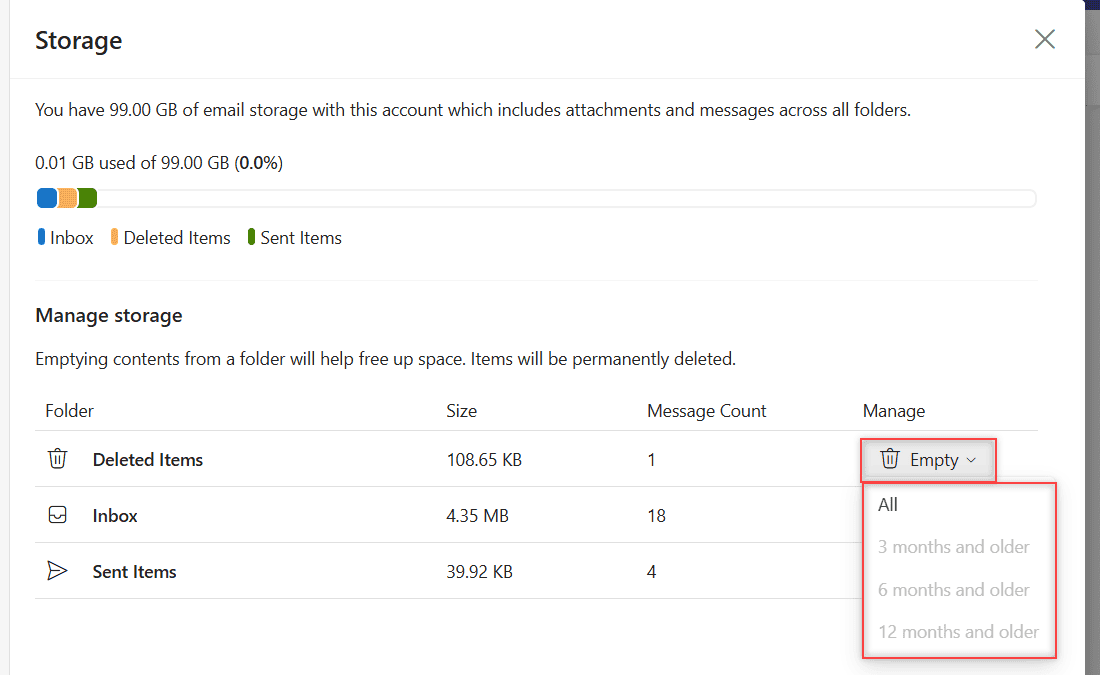
In my test the age options were greyed out because all the mail was new. I didn’t empty anything, and you should pause before you do: Outlook warns that emptied items are permanently deleted.
Want to keep old emails without the mailbox space? You can download an Outlook email first, or save important emails to OneDrive.
Limits and what happens when the mailbox is full
- Work mailboxes. At 98 GB you get a warning. At 99 GB you can’t send new email. At 100 GB incoming mail is rejected and senders get a bounce message.
- Office 365 E1. The same steps happen at 49, 49.5, and 50 GB.
- Outlook.com. Once you’re over the limit, you can’t send or receive email.
- Deleted Items counts. On Outlook.com it uses space until you empty it or it’s removed after 30 days, whichever comes first. Junk is cleared after 10 days.
If your work account is managed by an admin
On a school or company account, you can still check and empty your own folders. You can’t raise the mailbox size yourself.
If you keep hitting the limit, ask your IT admin whether an archive mailbox is an option for you. Your admin decides what your account can use, so that’s the right person to ask.
Heading out of the office while you sort it out? It’s worth taking a minute to set up automatic replies in Outlook first.
A few more Outlook Online guides you might like
- Forward several emails at once
- Change fonts in Outlook Online
- Create inbox rules in Outlook Online
- All Outlook Online tutorials
Common questions
How do I check my Hotmail storage?
Sign in to Outlook.com with your Hotmail address and go to Settings > Account > Storage. The page shows your usage broken down by folder.
What happens when Outlook storage is full?
On Outlook.com you can’t send or receive email until you free up space. A work mailbox first stops sending at 99 GB, then rejects incoming mail at 100 GB.
Does Deleted Items count toward my storage?
Yes. Deleted Items uses space until you empty it. On Outlook.com, items there are also removed automatically after 30 days.
How much storage does Office 365 give for email?
Most Microsoft 365 business and enterprise plans include a 100 GB mailbox. Office 365 E1 gets 50 GB and F3 gets 2 GB, according to Microsoft’s Exchange Online limits.

I am Carissa Gudinoa, a technology buff, and Office online and Apple expert with over 9 years of experience. I am passionate about helping others get the most out of their Apple devices. I have written extensively about Apple products and technologies. I am committed to providing my clients with the best possible service and am always up-to-date on the latest Apple products and features. I also write extensively on other software available for use at minimal cost or free. This includes Word Online, Outlook Online, Excel Online, and other Office online programs… Check out more.