
Is your Google Drive folder turning into one long, messy list of files? A subfolder fixes that. It’s just a folder you make while another folder is open, and it takes about ten seconds.
In this tutorial, I’ll show you how to create subfolders in Google Drive three ways: the New button, a right-click, and the Drive app on Android or iPhone. I’ll also color-code one so it’s easy to spot.
Method 1: Use the New button inside the parent folder
My demo account belongs to a made-up business, Bluebird Landscaping. I wanted a Clients 2026 folder inside it, with one subfolder per client. If you can’t spot your parent folder, here’s how to find folders in Google Drive first.
- Go to drive.google.com and double-click the folder that should hold the subfolder.
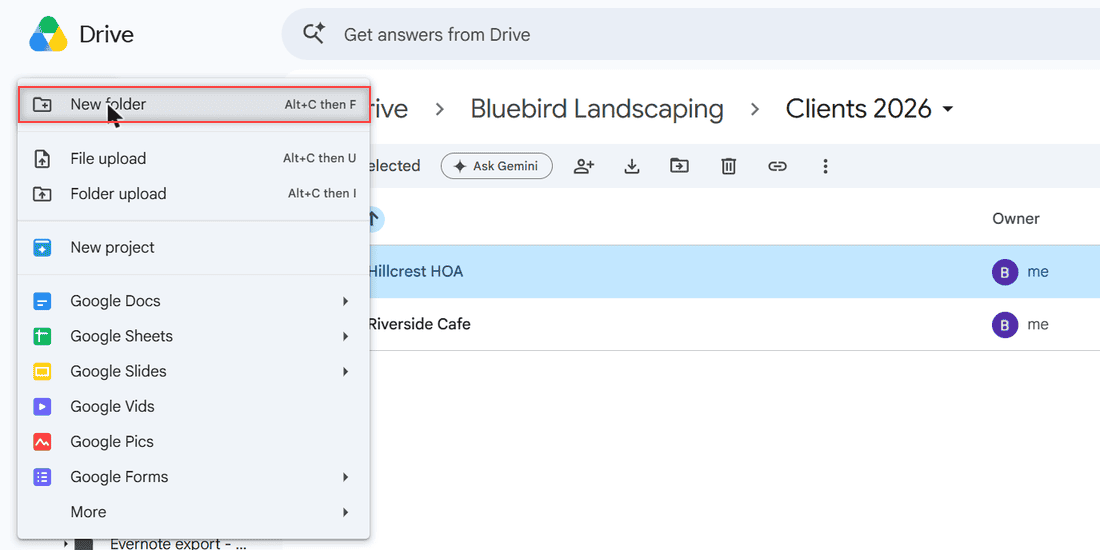
- Click + New at the top left and choose New folder.
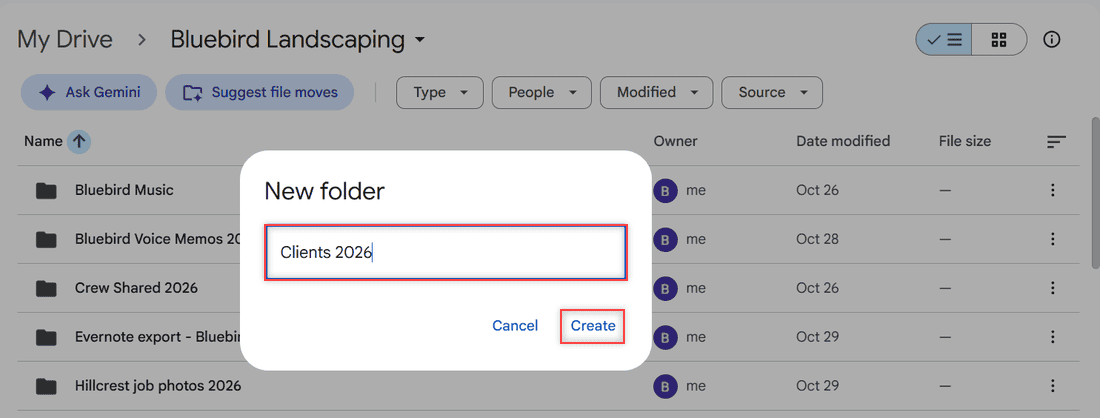
- Type a name and click Create.
How does this work?
Drive always puts the new folder in whatever folder you have open. Check the breadcrumb at the top before you click New. Mine read My Drive > Bluebird Landscaping, so Clients 2026 landed right there.
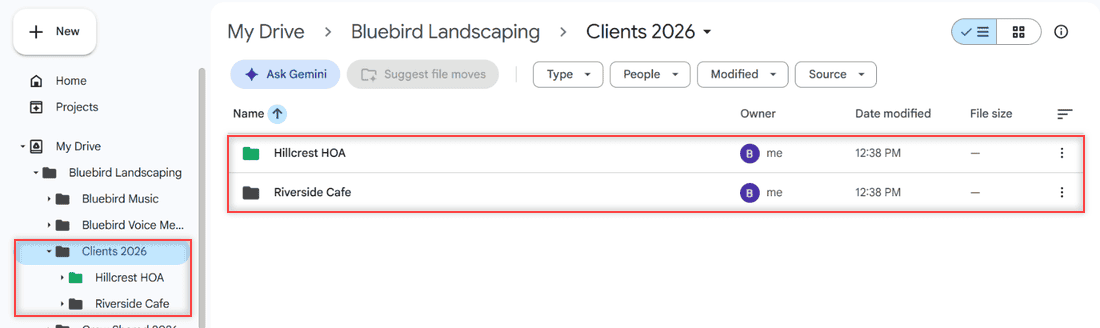
To nest deeper, open the new folder and repeat. I added Hillcrest HOA and Riverside Cafe inside Clients 2026. Then I could select multiple files on Google Drive and drag them onto the right subfolder.
Pro tip: The New menu lists a keyboard shortcut next to New folder. On my Windows PC it’s Alt+C, then F. Type the name, press Enter, and the folder is made without touching the mouse.
Method 2: Right-click an empty spot in the folder
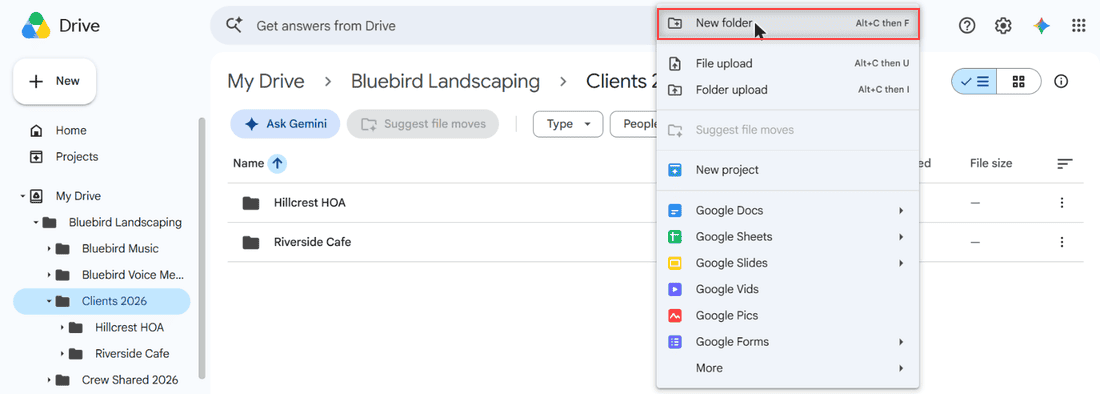
This is my favorite, because I’m usually already inside the folder. Right-click any blank area below the file list, pick New folder, name it, and click Create.
How does this work?
The right-click menu is the same create menu as the New button, so the folder lands in the folder you’re viewing. The left tree shows each level, and clicking a name there jumps straight into it. Once you’ve got a few levels, you can list every file in a folder and its subfolders.
Method 3: Make a subfolder in the Drive app on Android or iPhone
Google’s help pages give the same steps for Android and for iPhone or iPad.
- Open the Google Drive app and tap the folder that should hold the subfolder.
- Tap Add (the plus button) at the bottom right.
- Choose Folder, type a name, and tap Create.
How does this work?
Like on a computer, the app creates the folder where you are. Repeat inside the new folder for more levels. To fill it from your phone, see how to upload a folder to Google Drive on Android.
Color-code your subfolders so they stand out
On a computer, right-click a subfolder, point to Organize, and pick a swatch under Folder color. I made Hillcrest HOA green. In the app, tap More next to the folder, then Change color.
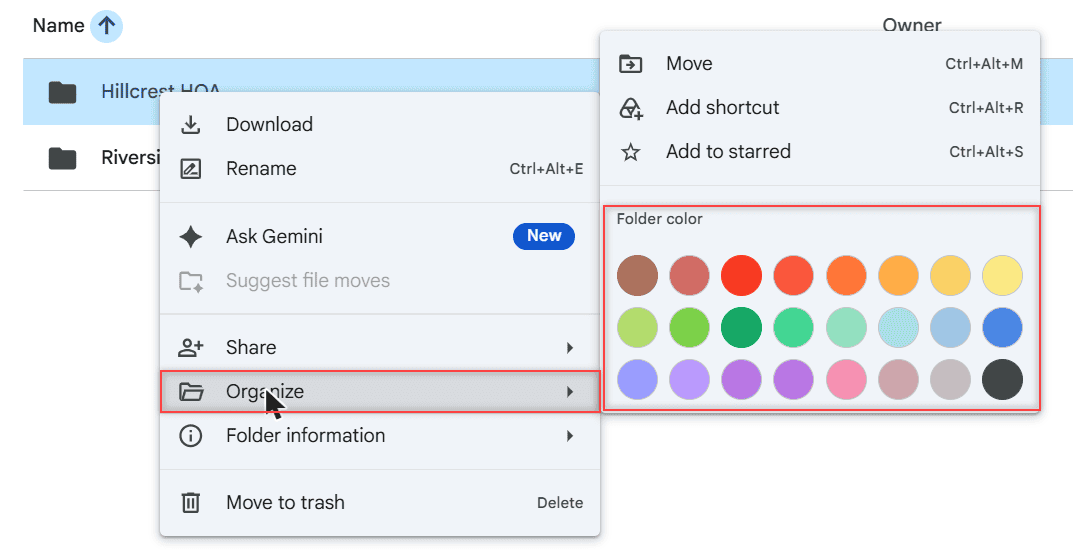
Google notes the color only changes your own view of Drive, so coworkers won’t see it. Pair colors with names that sort files in Google Drive neatly, like a year or client name.
Things to keep in mind
- Limits: Google’s Workspace help says a folder can hold up to 500,000 items directly in it, and My Drive folders can nest up to 100 levels deep.
- Shared drives: Managers, Content managers, and Contributors can create folders. Viewers and Commenters can’t, so ask a Manager for more access if New folder is missing.
- Moving files: You need permission to move a file out of its folder. If you don’t have it, Drive adds a shortcut in the subfolder instead.
- Personal vs Workspace: The steps are the same in a personal Gmail account and a work account. Shared drive roles only matter at work or school.
If you’d rather keep a folder off your computer, that’s a Drive for desktop question. My guides to install Drive for desktop and turn off Google Drive sync cover what you can change.
Once your folders are set up, these come in handy
- rename multiple files on Google Drive
- see folder size in Google Drive
- hide a folder in Google Drive
- unshare a folder in Google Drive
Frequently Asked Questions
How do I put an existing folder inside another folder?
Drag it onto the target folder, or right-click it and choose Organize > Move. Google covers both in Google Drive Help: Organize your files.
Can I create several subfolders at once in Google Drive?
Not from the New menu. It makes one folder at a time, but the Alt+C, then F shortcut and Enter make each one quick.
Why is New folder missing in a shared drive?
You probably have Viewer or Commenter access. Ask a Manager of the shared drive to make you a Contributor or Content manager.

I am Carissa Gudinoa, a technology buff, and Office online and Apple expert with over 9 years of experience. I am passionate about helping others get the most out of their Apple devices. I have written extensively about Apple products and technologies. I am committed to providing my clients with the best possible service and am always up-to-date on the latest Apple products and features. I also write extensively on other software available for use at minimal cost or free. This includes Word Online, Outlook Online, Excel Online, and other Office online programs… Check out more.