Skip to content
TechnologyDots
TechnologyDots
  • Home
  • Google Drive
  • Outlook
  • Mac
  • Blogs

Carissa Gudino

I am Carissa Gudinoa, a technology buff, and Office online and Apple expert with over 9 years of experience. I am passionate about helping others get the most out of their Apple devices. I have written extensively about Apple products and technologies. I am committed to providing my clients with the best possible service and am always up-to-date on the latest Apple products and features. I also write extensively on other software available for use at minimal cost or free. This includes Word Online, Outlook Online, Excel Online, and other Office online programs... Check out more.

How to Add Birthdays to Your Outlook Calendar (New Outlook and Web)
October 24, 2026February 28, 2023 by Carissa Gudino
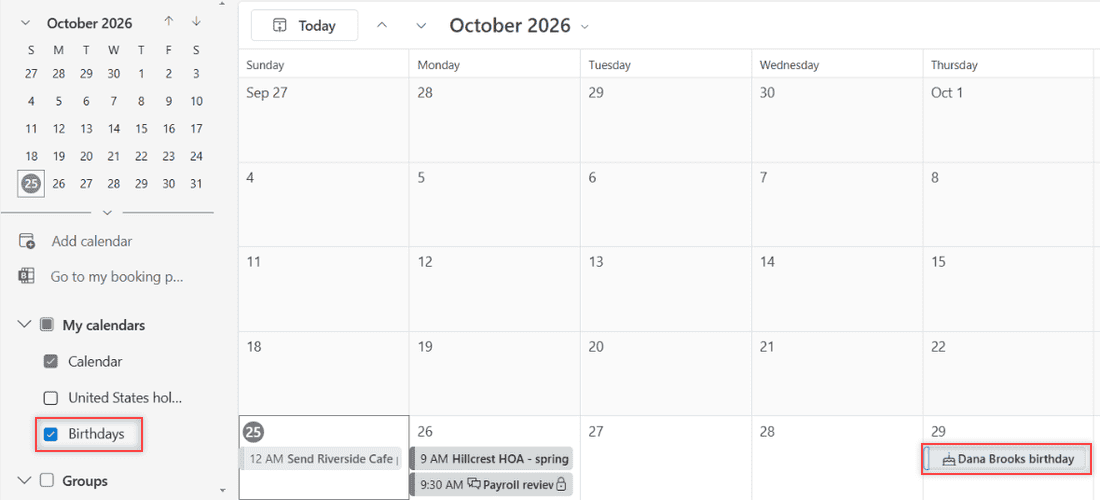
Outlook on the web month view for October 2026 with Dana Brooks birthday and a cake icon on Thursday October 29

Turn on the Outlook Birthdays calendar, add a birthday from a contact or the calendar, then edit, hide or delete it in new Outlook and on the web.

How to Download Emails from Outlook Online (4 Easy Ways)

October 24, 2026February 28, 2023 by Carissa Gudino
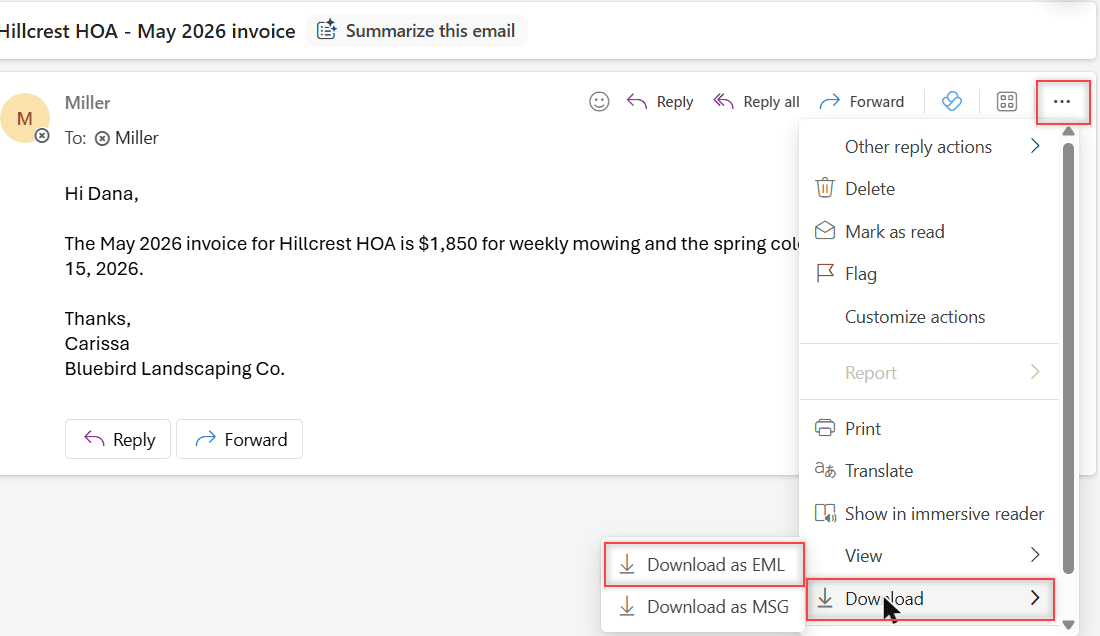
Outlook on the web with the Hillcrest HOA May 2026 invoice email open, the More actions menu showing Download and the Download as EML option

Download one Outlook email as EML or MSG, save it as a PDF, grab several at once, or export your whole mailbox to a PST file. Tested in Outlook on the web.
How to Remove an Account from Outlook (Web, Windows, Mac, iPhone, Android)

October 24, 2026February 28, 2023 by Carissa Gudino
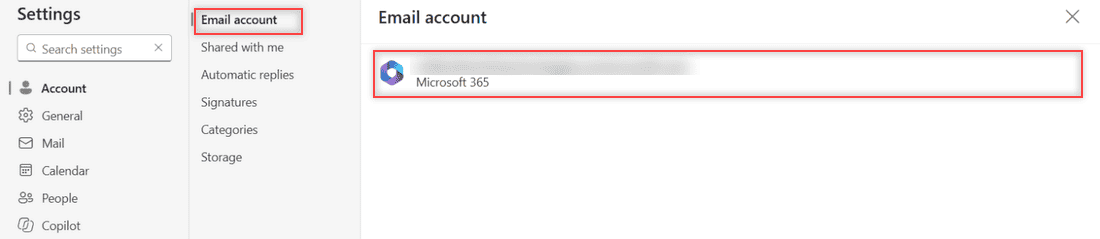
Outlook on the web Settings, Account, Email account page showing one Microsoft 365 account and no Remove button

Outlook on the web has no Remove button for your own account, so you sign out. Here’s how removal works in Outlook for Windows, Mac, iPhone and Android.
How to Clear Outlook Search History (Recent Searches)

October 24, 2026February 27, 2023 by Carissa Gudino
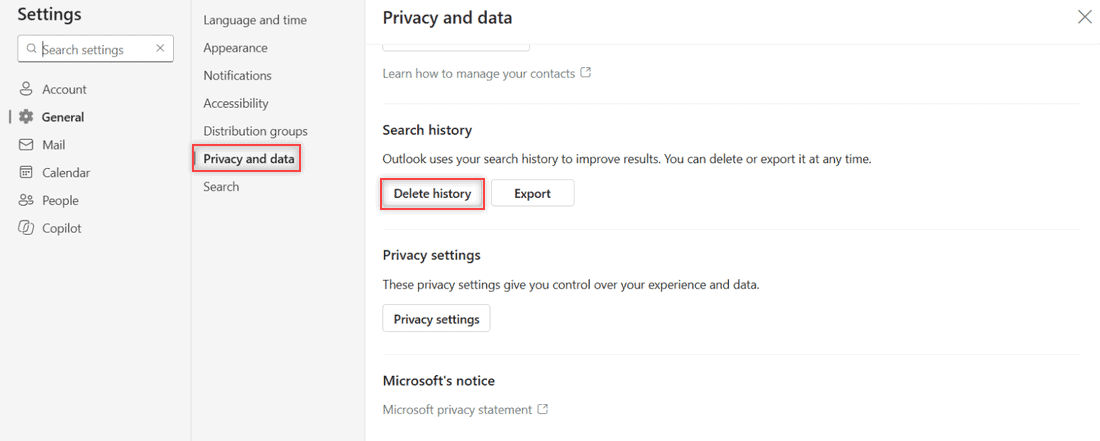
Outlook on the web Settings with General and Privacy and data selected and the Delete history button under Search history

Clear Outlook search history in a few clicks: Settings > General > Privacy and data > Delete history. Why recent searches linger, and what stays.
How to Reduce Image Size in Outlook (Web and Classic Outlook)

October 24, 2026February 14, 2023 by Carissa Gudino
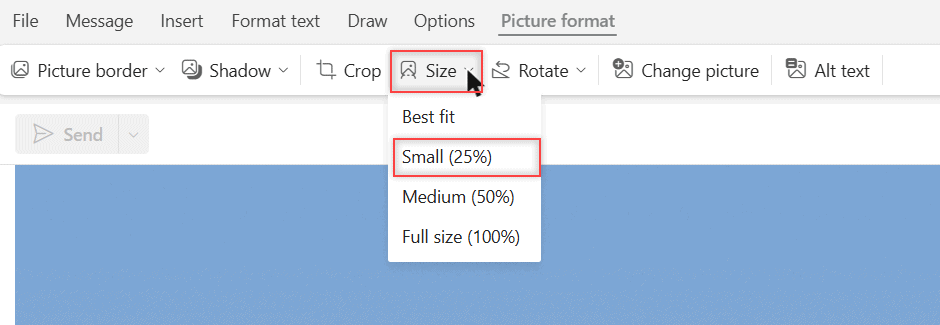
Picture format tab in Outlook on the web with the Size menu open and Small (25%) highlighted

Reduce image size in Outlook: move a photo into the message body, use Picture format > Size, or resize large images in classic Outlook.
How to Set Automatic Replies in Outlook Online (Out of Office)

November 9, 2026February 9, 2023 by Carissa Gudino
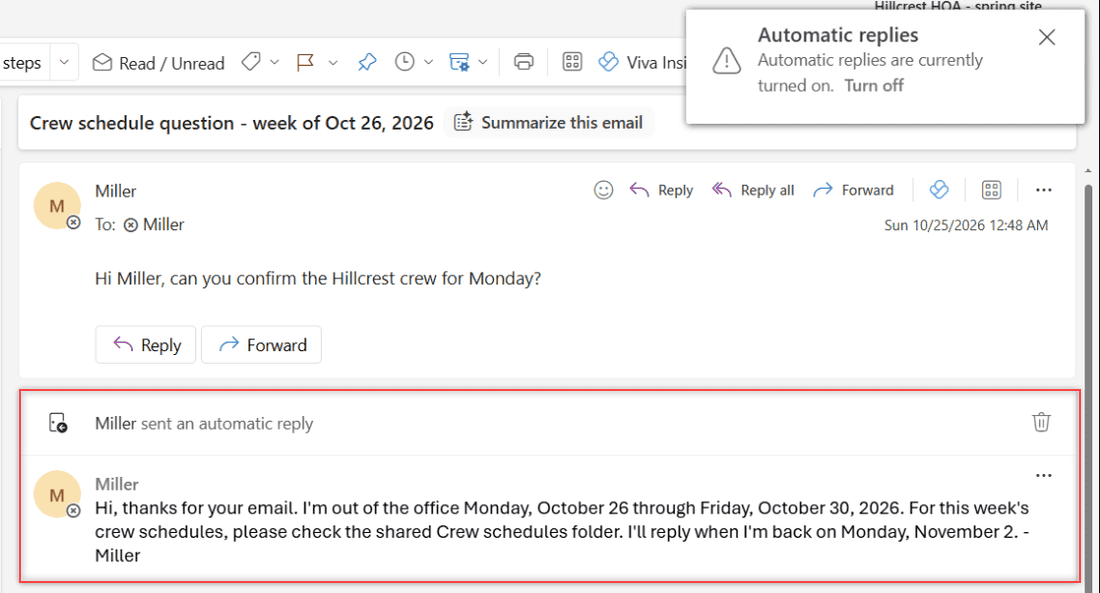
An Outlook on the web conversation showing the test email and the automatic reply with the out of office message for coworkers

Turn on automatic replies in Outlook on the web, schedule your dates, write inside and outside messages, test the reply, and turn it off when you are back.
How to Mark an Event as Private in Outlook (Web, New and Classic Outlook)

November 9, 2026February 6, 2023 by Carissa Gudino
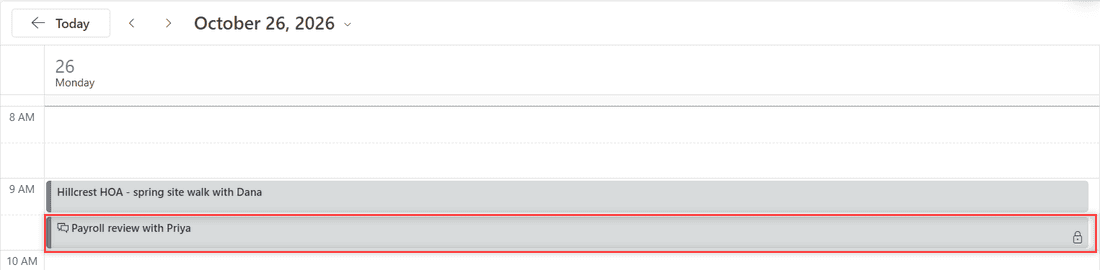
Outlook on the web Day view for Monday October 26 2026 with the Payroll review with Priya event showing a lock icon next to a regular Hillcrest HOA event

Mark an event as private in Outlook on the web with the lock button or a right-click, then see who can still view the details and how sharing fits in.
How to Create Inbox Rules in Outlook Online (Invoices Example, Step by Step)

October 24, 2026February 2, 2023 by Carissa Gudino
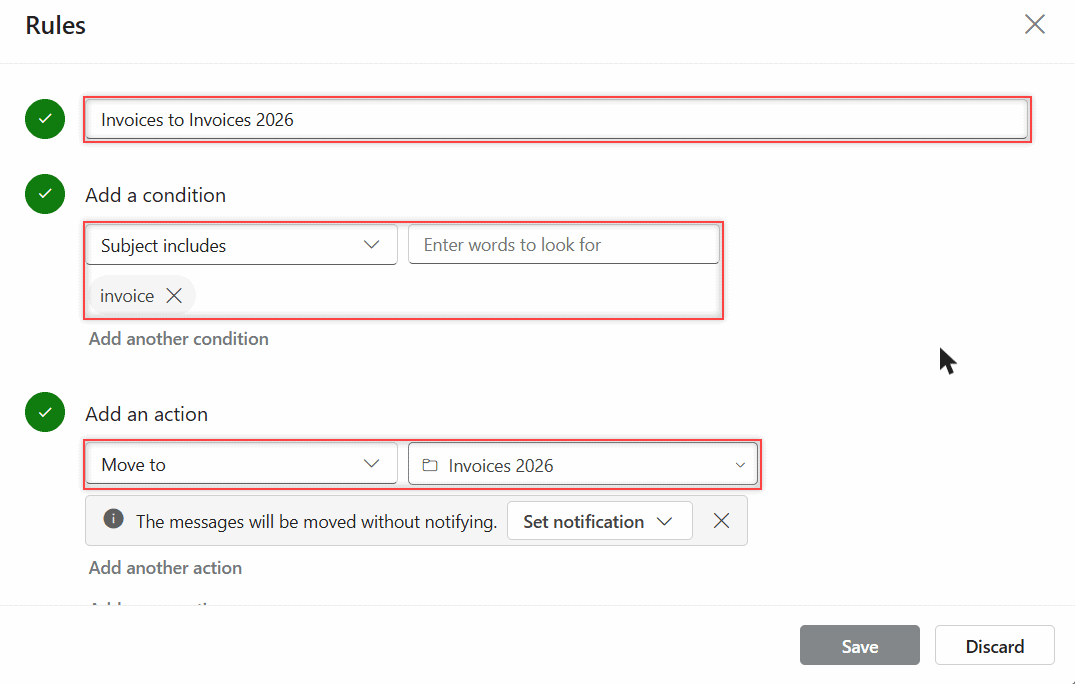
Outlook on the web rule with Subject includes invoice and Move to Invoices 2026 filled in, plus the moved without notifying note

Create inbox rules in Outlook on the web: name the rule, pick a condition and action, run it on mail you already have, then edit, pause, or reorder it.
How to Set Calendar Reminders in Outlook (Microsoft 365)

October 24, 2026February 1, 2023 by Carissa Gudino
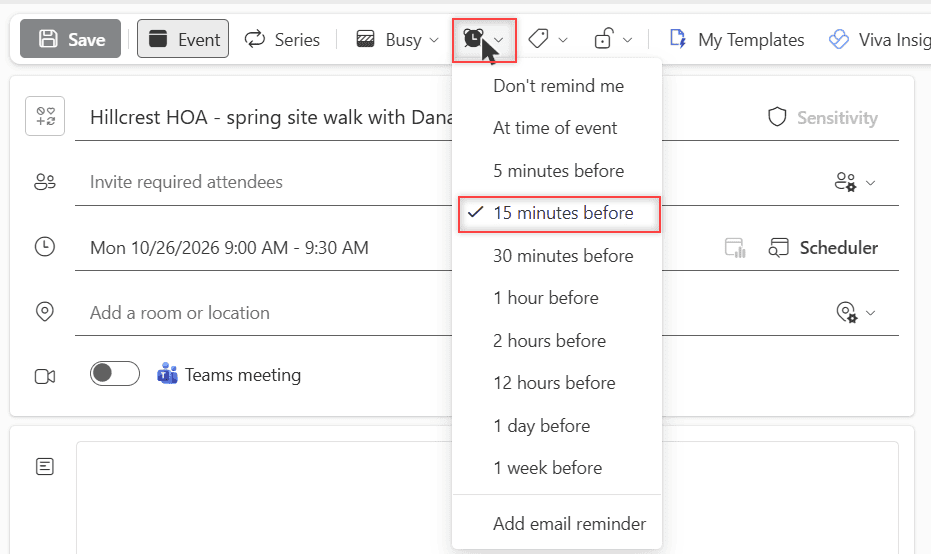
A new Outlook on the web event called Hillcrest HOA - spring site walk with Dana on Monday 10/26/2026 at 9:00 AM, with the reminder dropdown open and 15 minutes before checked

Set a reminder on one Outlook event, add an email reminder, change the default, and control the pop-up. Tested in Outlook on the web for Microsoft 365.
How to Access the OneDrive Recycle Bin (Web, PC, and Phone)

November 9, 2026November 30, 2022 by Carissa Gudino
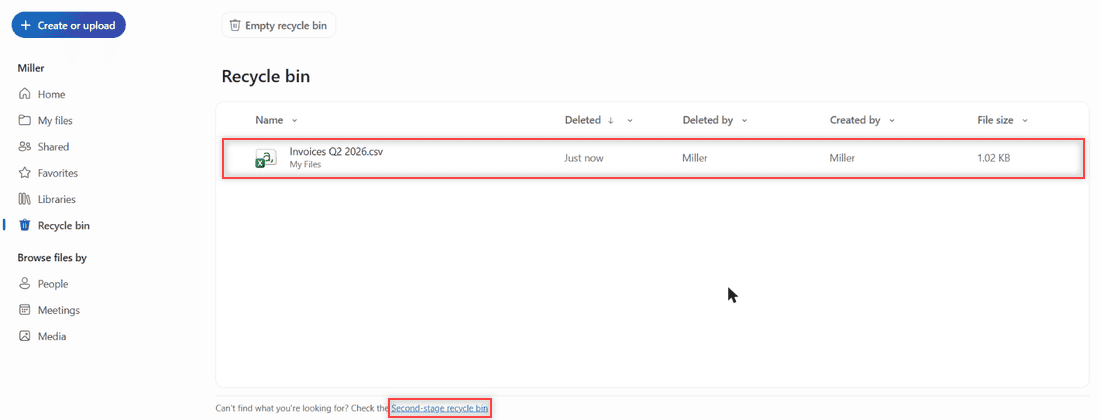
OneDrive recycle bin listing a deleted file with the Second-stage recycle bin link at the bottom

Find the OneDrive recycle bin on the web, phone, or PC, restore deleted files, and learn how long OneDrive keeps them (30 or 93 days).

Older posts
Newer posts
← Previous Page1 … Page11 Page12 Page13 … Page16 Next →

Recent Posts

  • How to Transfer Google Drive Files to Another Account (3 Ways)
  • How to Organize Google Drive: 8 Rules I Actually Follow
  • What Is OneDrive and Do I Need It? A Plain-English Answer
  • How to Share a Folder in OneDrive (Web, PC and Phone)
  • How to Delete Files From OneDrive (Web, PC and Phone)
  • About TechnologyDots.com
  • Contact
  • Privacy Policy
  • Sitemap
© 2026 Technology Dots